Your business runs on software that has worked for years. But now, employees spend hours entering the same data into different systems. Reports take days to prepare. New tools cannot connect with your current platform. Even a small update requires outside help.
Does this mean you need entirely new software? Not always.
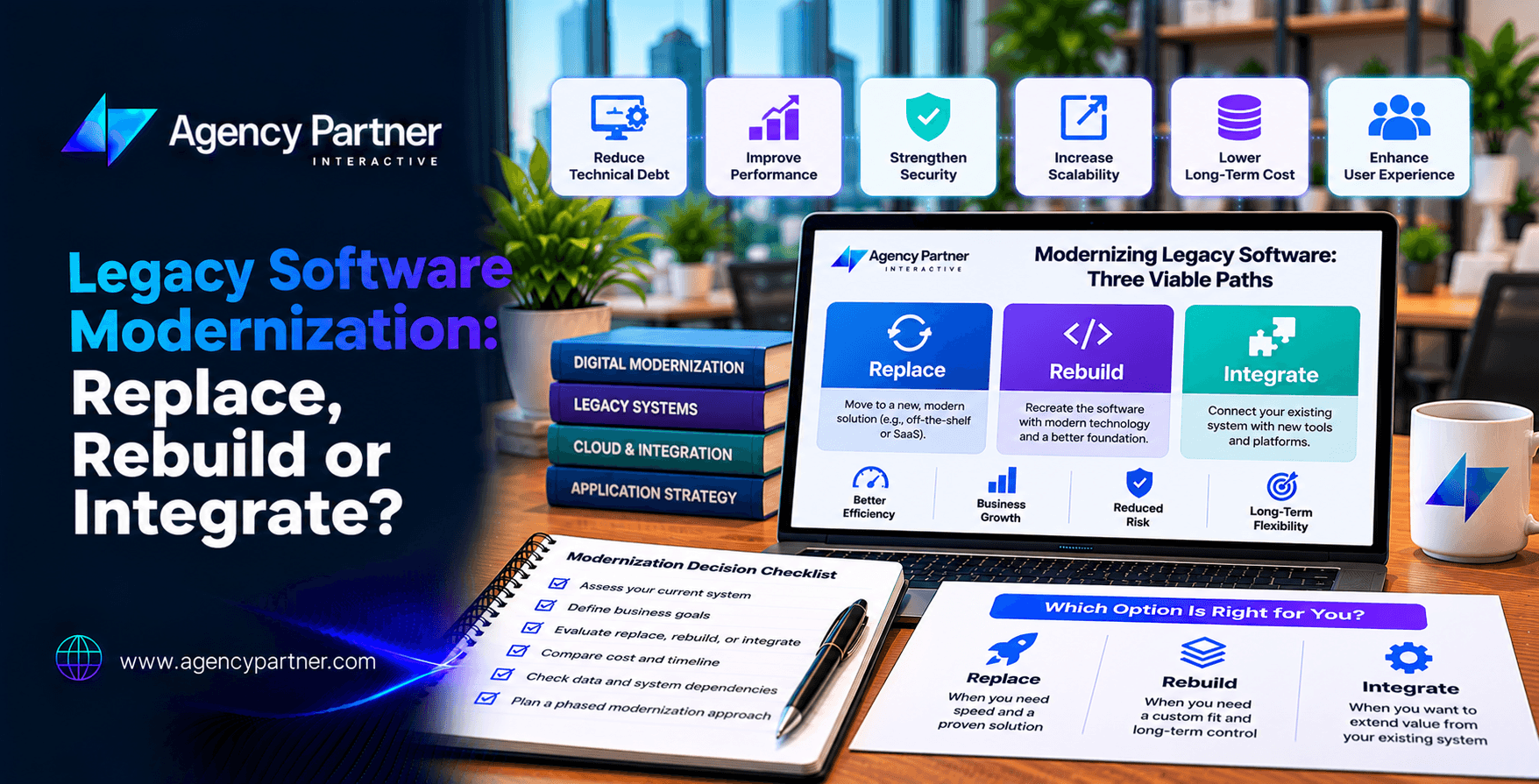
Legacy software modernization gives businesses several ways to improve outdated systems. You can replace the application, rebuild it, or connect it with modern tools. Each option has different costs, risks, and benefits.
The right choice depends on your current system, business goals, and future needs. This guide explains when to replace, rebuild, or integrate legacy software and how to choose an approach that supports business growth.
What Is Legacy Software Modernization?
Legacy software modernization is the process of updating older applications so they can meet current business and technical needs. A legacy system is not simply old software.
It becomes a problem when its technology, design, or limits make daily work harder. For example, an older inventory platform may still track stock correctly but lack connections to modern sales systems.
Modernization could involve adding an integration, improving the code, moving to a new platform, or replacing the system. According to IBM’s application modernization guide, common approaches include rehosting, replat forming, refactoring, rebuilding, and replacing applications. The goal is to improve business performance without making unnecessary changes.
How Do You Know Your Business Has Outgrown Its Software?
The warning signs often appear in daily operations before a major failure occurs. Employees may develop workarounds because the software cannot support new processes. A September 2026 discussion on Reddit’s small business community raised similar concerns, including repeated data entry, manual reports, and disconnected tools.
Seven Signs Your Software Needs Attention
- Employees enter the same information into several systems.
- Reports require hours of manual work.
- Important approvals happen through email or spreadsheets.
- The software cannot connect with newer applications.
- Security updates are no longer available.
- Only one employee understands critical workflows.
- Maintenance costs keep rising without clear improvements.
These problems do not always require a full replacement. Sometimes, legacy application modernization can focus on the parts that create the most delays.
Business takeaway: Modernize when software limits your operations, not simply because it looks outdated.
Replace vs. Rebuild vs. Integrate: What’s the Difference?
Before choosing a strategy, compare the three main options.
| Factor | Replace | Rebuild | Integrate |
| Main approach | Move to a new platform | Build a new application | Connect existing systems |
| Initial cost | Varies by platform | Often highest | Often lower for limited scope |
| Implementation time | Depends on migration | Usually longer | Often shorter |
| Customization | Limited by provider | Extensive | Depends on system access |
| Main risk | Data and process changes | Development complexity | Integration limits |
| Best fit | Standard business needs | Unique workflows | Reliable but disconnected systems |
The rebuild vs replace software decision often depends on how unique your business processes are. Integration offers a third option when the existing application still performs its main job well.
1. When Should You Replace Legacy Software?
Replacement means moving from an older application to a different software product. This might involve adopting a modern SaaS platform or purchasing an existing business application.
When Does Replacement Make Sense?
Choose replacement when your current software has serious limits and an established product already supports your needs. For example, a growing consulting firm may use an outdated CRM that lacks mobile access and basic automation.
Instead of building a new CRM, the company could move to a modern platform.
Replacement may offer:
- Faster access to modern features
- Vendor-managed updates
- Improved user experience
- Less responsibility for maintaining custom code
However, replacing software creates new challenges. Employees need training. Data must move correctly. Existing workflows may need to change. Subscription fees and vendor limits also affect long-term costs.
Best choice: Replace software when your needs are common and a suitable platform already exists.
2. When Should You Rebuild Legacy Software?
Rebuilding means creating a new application to replace the existing codebase. This approach gives businesses greater control over features, architecture, and integrations. However, it usually requires more time and investment.
When Is Rebuilding Worth the Cost?
Consider rebuilding when your existing application supports important workflows that standard software cannot handle. For example, a logistics company may use a custom dispatch system with unique delivery rules. The software works, but its outdated code makes updates difficult. A rebuild could preserve the valuable business logic while improving performance and usability.
What Are the Main Risks?
A rebuild can introduce unexpected problems if the team does not understand the old system. Important rules may be hidden in code, reports, or employee workarounds.
Before development begins, document:
- Current features and workflows
- Business rules
- Data structures
- User permissions
- External integrations
- Performance requirements
The rebuild vs replace software comparison should also include long-term maintenance. A custom application provides more control, but your business remains responsible for its upkeep.
Best choice: Rebuild when unique software capabilities create real business value.
3. When Should You Integrate Legacy Systems?
Integration connects existing software with newer applications. It allows businesses to improve workflows without replacing every system. This approach is useful when the current application remains reliable but lacks modern connections.
How Does Legacy System Integration Work?
Legacy system integration may use APIs, middleware, or secure data connections to exchange information. Consider a manufacturer using an older inventory system.
The platform tracks stock accurately but cannot share information with its ecommerce website. Instead of replacing the inventory system, the company could create an integration that updates product availability. This may reduce manual work while preserving existing operations.
What Are the Limitations?
Not every legacy system supports modern connections. Older databases, limited documentation, and security risks can make integration difficult. An integration can also create ongoing costs if the underlying system is unstable.
Best choice: Integrate when your software still works well but needs to communicate with newer tools.
Can You Modernize Software Without Replacing Everything?
Yes. Many businesses benefit from gradual improvements rather than a complete system change. Microsoft describes an approach called the Strangler Fig pattern. It allows teams to replace parts of an older application over time while the remaining system continues to operate.
For example, a business could modernize its customer portal first. Later, it might replace reporting tools and internal workflows. This phased method can reduce disruption, although it requires careful planning while old and new systems operate together.
A phased legacy application modernization plan should define which features move first and how teams will test them. The approach works best when systems have clear boundaries and can exchange data safely.
How Much Does Legacy Software Modernization Cost?
Costs depend on system complexity, data quality, integrations, and the selected approach. There is no single reliable price for every project. A simple API integration may cost far less than rebuilding an enterprise platform.
Likewise, replacing software with SaaS may reduce initial development costs but introduce subscription and migration expenses.
What Should Your Budget Include?
| Cost area | What it covers |
| System assessment | Reviewing code, workflows, and risks |
| Development or licensing | Building software or buying a platform |
| Data migration | Moving and validating business information |
| Integrations | Connecting existing and new systems |
| Testing | Checking features, security, and performance |
| Training | Helping employees adopt the new system |
| Maintenance | Updates, monitoring, and support |
Compare costs over three to five years. Include the cost of keeping the old system running during the transition. A cheaper launch does not always mean a cheaper long-term solution.
What Are the Biggest Risks of Modernizing Legacy Software?
Every modernization project involves risk. The goal is to identify those risks before they affect customers or employees.
Data Loss
- Incomplete migration can cause missing records or incorrect reports.
- Create backups and validate transferred data before retiring old systems.
Business Downtime
- A failed launch can interrupt sales, orders, or internal operations.
- Use staged releases and prepare a rollback plan.
Hidden Dependencies
- Older applications may connect to systems that are poorly documented.
- Review integrations before making major changes.
Security Problems
- Unsupported technology may contain weaknesses that are difficult to fix.
- Include security testing and access reviews in the project.
Employee Resistance
- Teams may struggle with unfamiliar workflows.
- Involve employees early and provide training.
Successful legacy software modernization depends on technical planning and clear communication.
How Do You Choose the Right Modernization Strategy?
Start with a full review of your current system. Microsoft recommends assessing applications, infrastructure, costs, and business goals before choosing a modernization path.
Use these five steps.
Step 1: Identify the Business Problem
- Determine what the current software prevents your team from doing.
- Focus on measurable problems such as delays, errors, or high support costs.
Step 2: Review the Existing System
- Assess its code, security, integrations, data, and performance.
- Identify which functions still work well.
Step 3: Compare Your Options
- Evaluate replacement, rebuilding, and legacy system integration.
- Consider cost, timeline, risk, and future growth.
Step 4: Test the Preferred Approach
- For complex projects, begin with a small proof of concept.
- This can help confirm whether an integration or new architecture will work.
Step 5: Build a Phased Roadmap
- Set priorities, milestones, testing requirements, and success measures.
- Avoid changing every system at once unless there is a clear reason.
How Agency Partner Interactive Helps Modernize Business Software
Modernizing older software requires a clear understanding of your current systems and business goals. Agency Partner Interactive provides custom software development services for businesses that need tailored applications, integrations, and modern digital platforms.
The team supports software planning, development, and technical integration projects. Whether your business needs a new application or improvements to existing workflows, the first step is defining the problem.
Agency Partner Interactive can help evaluate project requirements and plan a practical development approach.
Ready to improve your existing software? Discuss your modernization goals with Agency Partner Interactive.
Final Thoughts: Replace, Rebuild, or Integrate?
The right legacy software modernization strategy depends on what your business needs. Replace software when an existing product can meet your requirements. Rebuild when unique workflows require a custom application.
Integrate when your current system remains useful but needs better connections. You may also combine these approaches through a phased modernization plan. Before making a decision, review your software, estimate long-term costs, and identify the risks. Agency Partner Interactive helps businesses plan software improvements around their goals.
Ready to explore your options? Connect with Agency Partner Interactive.
Frequently Asked Questions
-
What is legacy software modernization?
Legacy software modernization means improving older applications so they meet current business needs. It may involve updating code, moving to newer infrastructure, connecting systems, rebuilding features, or replacing outdated software with a modern platform.
-
Should I rebuild or replace legacy software?
The rebuild vs replace software decision depends on your requirements. Replace software when an existing product meets your needs. Rebuild when unique workflows, complex rules, or custom features provide enough business value to justify development.
-
Can legacy software be integrated with modern applications?
Yes. Legacy system integration can connect older applications with modern platforms through APIs, middleware, or data exchange tools. However, integration options depend on system access, documentation, security, and the condition of the existing software.
-
How long does legacy application modernization take?
A small integration may take several weeks, while a major rebuild can take many months or longer. Legacy application modernization timelines depend on system complexity, data migration, testing, and the number of business processes involved.
-
Is it cheaper to modernize software or replace it?
It depends on the system. Updating or integrating existing software may cost less initially. Replacement may offer better long-term value when maintenance is expensive or the technology is unsupported. Compare total costs before choosing.
-
What are the biggest challenges in legacy software modernization?
Common challenges include outdated code, missing documentation, hidden integrations, data migration, security risks, and employee training. A system assessment, clear requirements, phased testing, and a rollback plan can help reduce these risks.