Getting someone to sign up for your software is an important milestone, but it does not guarantee that they will become an active customer. Many users create accounts, explore a few features, and leave before understanding how the product can help them.
This is where SaaS onboarding emails play an important role. A well-planned onboarding journey helps new users complete setup, discover useful features, and experience the product’s value before they lose interest.
However, sending the same welcome message and reminders to every user rarely delivers the best experience. Businesses need email workflows that respond to actual product activity, recognize completed actions, and stop sending messages when they are no longer relevant.
In this guide, we explain how to build effective onboarding journeys, define activation goals, create helpful messages, and measure results without overwhelming users.
What Are SaaS Onboarding Emails?
SaaS onboarding emails are automated messages sent to new users after they register for a software product. Their purpose is to guide users through the first important steps, explain useful features, and encourage actions that lead to long-term product adoption.
Unlike promotional campaigns, onboarding messages focus on helping users succeed with the product. For example, a project management platform may guide new customers through creating their first project, inviting teammates, and assigning tasks.
Effective SaaS email marketing connects these messages with user behavior rather than relying only on fixed sending schedules. Someone who has completed setup should receive different guidance from someone who has not started.
A good onboarding program also supports the wider SaaS customer journey. As explained in Agency Partner Interactive’s B2B SaaS marketing funnel guide, customer acquisition is only one stage of growth. Activation, retention, and expansion also influence long-term performance.
Why Is User Activation the Main Goal of SaaS Onboarding?
User activation happens when a new customer completes a meaningful action that demonstrates the product’s value. This action varies depending on the software and should be defined before building an email workflow.
For a CRM platform, activation might mean importing contacts and creating the first sales pipeline. For an analytics tool, it could involve connecting a data source and viewing the first report.
The purpose of activation emails is to help users reach that meaningful milestone without unnecessary steps. Instead of promoting every available feature, the messages should focus on the next action most likely to help the customer succeed.
Businesses should also distinguish between account setup and activation. A user may verify their email address and complete a profile without experiencing the software’s core benefit. Marketing, product, and customer success teams should agree on the activation event and how it will be recorded.
How Do You Build an Effective SaaS Onboarding Email Workflow?
A strong onboarding workflow starts with a clear understanding of what users need after registration. It should account for their signup source, account type, trial status, and product activity.
The first step is identifying the events that matter. These may include account creation, email verification, workspace setup, feature usage, and subscription upgrades.
Next, connect those events to your email platform so that messages can be sent when users need them.
Trial email sequences should also reflect how much time remains in the trial and whether the user has experienced the product’s value. A customer who has already activated may benefit from advanced guidance, while an inactive user may need help completing the first step.
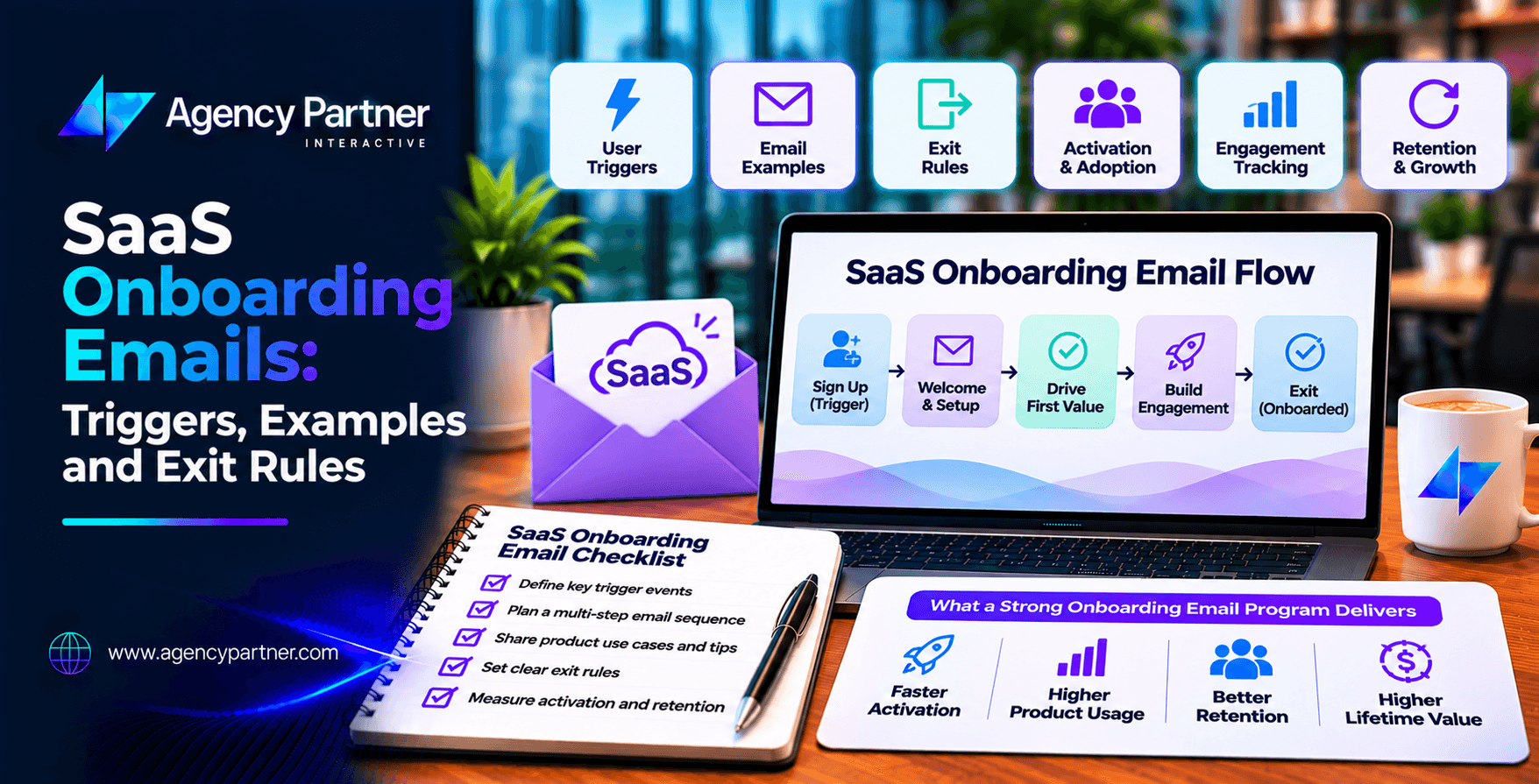
SaaS Onboarding Email Trigger, Message and Exit Table
| Stage | Trigger | Message purpose | Exit rule |
| Welcome | Account created | Explain the first step and link to the product | Initial setup completed |
| Incomplete setup | Required setup unfinished after 24 hours | Help the user finish setup | Setup completed |
| Feature education | First core action completed | Introduce the next useful feature | Feature used or journey changed |
| Activation | Key product milestone reached | Recognize progress and suggest next steps | Move to active-user journey |
| Trial reminder | Trial approaching expiration | Explain remaining time and available options | Upgrade, cancellation, or trial expiration |
| Re-engagement | No meaningful activity during an agreed period | Offer relevant help or resources | User returns, opts out, or journey ends |
These triggers are examples rather than universal rules. The right timing depends on product complexity, trial length, and customer behavior.
1. Welcome Emails: Help Users Take the First Step
The welcome email should arrive soon after a user successfully registers, provided the message is appropriate for the account and communication permissions. Its purpose is to confirm that the account is ready and explain the first useful action. It should not overwhelm new customers with a long feature list or several competing calls to action.
For example, a project management tool might encourage users to create their first workspace. The email can include a short explanation of why this matters and a direct link to the relevant screen.
Sample Welcome Email
Subject: Welcome to [Product Name] — Let’s Set Up Your Workspace
Hi [First Name],
Welcome to [Product Name]! We’re glad you’re here and look forward to helping your team manage projects with less manual work.
The best place to start is by creating your first workspace. This gives you a central location to organize projects, invite teammates, and track progress.
You can complete this step in just a few minutes. Once your workspace is ready, we’ll help you explore the features that match your team’s needs.
CTA: Create Your Workspace
Thanks for joining us,
The [Product Name] Team
This is one of the most useful onboarding email examples because it gives users a clear starting point without introducing unnecessary complexity.
2. Incomplete Setup Reminders: Remove Barriers to Progress
Not every user completes onboarding during their first session. Some may get distracted, encounter a technical issue, or need information from another team member. Incomplete setup reminders should recognize where the user stopped and offer help with that specific task.
For example, if someone created an account but never connected their data source, the reminder should explain how to complete that connection.
These SaaS onboarding emails should stop immediately after the required action is completed. Continuing to send setup reminders after completion can confuse customers and make the product appear disconnected from their activity.
Sample Incomplete Setup Email
Subject: Need Help Finishing Your Setup?
Hi [First Name],
We noticed that your [Product Name] account is ready, but your workspace setup is not complete yet.
Connecting your first project will help you organize tasks and see how your team can work together in one place.
If you need help, our setup guide walks you through the process. You can also contact our support team if something is preventing you from moving forward.
CTA: Finish Your Setup
We’re here to help you get started,
The [Product Name] Team
3. Feature Education Emails: Introduce Value at the Right Time
Once users complete their first important action, the next step is helping them discover features that support their goals. Feature education should follow a logical progression. A user who has created a project may be ready to invite teammates, but someone who has not created a workspace probably does not need advanced reporting instructions. This approach makes SaaS email marketing more relevant because each message responds to the customer’s current experience.
Sample Feature Education Email
Subject: Your First Project Is Ready. Here’s What’s Next.
Hi [First Name],
You’ve created your first project in [Product Name], and now you can start bringing your team together.
Invite a teammate to assign responsibilities, share updates, and keep everyone informed as work moves forward.
You can also explore our short guide to team collaboration, which explains how to organize tasks and track deadlines.
CTA: Invite Your Team
We hope this helps you make the most of your workspace,
The [Product Name] Team
These onboarding email examples show why helpful messages should focus on one clear action instead of promoting every product feature at once.
4. Activation Emails: Recognize Meaningful Progress
When a user reaches the defined activation milestone, the onboarding journey should change. For example, a reporting platform might consider a user activated after they connect a data source and generate their first dashboard. Once that event occurs, the customer no longer needs basic setup reminders.
Instead, activation emails can recognize the completed milestone and introduce a relevant next step, such as sharing a dashboard or scheduling automated reports.
The message should reflect actual product activity. Avoid congratulating users on achievements they have not completed. This is also a useful point to move customers into a product adoption or retention workflow, where the focus shifts from initial setup to regular use.
5. Trial Expiry Emails: Help Users Make an Informed Decision
Trial reminders should give customers accurate information about their remaining access and available subscription options. For a 14-day trial, a business might send reminders three days and one day before expiration. However, the schedule should be tested against customer behavior rather than treated as a fixed rule.
Effective trial email sequences should explain what happens when the trial ends, whether payment is required, and which features remain available.
Users who have already upgraded should not receive messages asking them to purchase a subscription. Similarly, canceled accounts should not continue receiving routine upgrade reminders.
Sample Trial Expiry Email
Subject: Your [Product Name] Trial Ends in 3 Days
Hi [First Name],
Your free trial of [Product Name] is scheduled to end in three days. We hope you’ve had an opportunity to explore how the platform can support your team’s work.
If you’d like to continue using the paid features after your trial, you can review the available plans and choose the option that fits your needs.
If you’re still evaluating the platform, our team can answer questions about features, pricing, and setup.
CTA: Explore Your Plan Options
Thank you for trying [Product Name],
The [Product Name] Team
When Should SaaS Onboarding Emails Stop?
Exit rules are just as important as enrollment triggers because they prevent customers from receiving outdated or repetitive messages. A user should leave a setup workflow when the required action is completed. They should also exit when they upgrade, cancel, become ineligible, or move into a different customer journey.
For example, a trial user who becomes a paying customer should transition into the appropriate paid-customer onboarding process instead of continuing to receive trial conversion messages. Businesses should also prevent conflicting campaigns. A customer receiving a direct message from a customer success manager may not need another automated email covering the same topic.
For trial email sequences, exit conditions should be checked before every send, not only when the workflow begins. Unsubscribes and applicable communication preferences must also be respected. Necessary account or service notices should be managed separately from promotional messages.
How Do You Measure SaaS Onboarding Email Performance?
Email opens and clicks provide useful engagement signals, but they do not tell the full story of onboarding success. The most important measure is whether users complete the activation goal and continue using the product.
Activation rate can be calculated as:
Activation Rate = (Users Who Complete the Activation Event ÷ Eligible New Users) × 100
For example, if 500 eligible users register and 175 complete the activation event, the activation rate is 35%.
Businesses should also measure time to activation, setup completion, trial-to-paid conversion, and early retention. Compare results across signup sources and customer segments to identify where users experience difficulty.
Well-designed activation emails should contribute to measurable product progress, but teams should avoid assuming that every conversion was caused by an email. Product experience, customer support, and other channels also influence outcomes.
Common Mistakes to Avoid in SaaS Email Onboarding
One common mistake is sending too many messages before users have completed their first important task. This can distract customers and make onboarding feel more complicated than necessary.
Another issue is relying only on scheduled emails without checking product activity. When automation does not reflect user behavior, customers may receive reminders for actions they have already completed.
Businesses should also avoid using the same journey for every account. A small business owner exploring a product independently may need different guidance from an enterprise customer working with an implementation team.
Reviewing onboarding email examples can help teams improve their copy, but every message should be adapted to the product, audience, and activation goal.
How Agency Partner Interactive Can Help Improve SaaS Email Onboarding
Building an onboarding journey requires more than writing a welcome email. Businesses need reliable event tracking, useful segmentation, clear automation rules, and messages that support real customer needs.
Agency Partner Interactive offers email marketing services that include campaign strategy, automated workflows, audience segmentation, and performance reporting.
Whether your business is launching a new SaaS product or improving an existing customer journey, a structured review can help identify missing triggers, repetitive messages, and opportunities to improve activation.
Request a SaaS Onboarding Workflow Review
Share your signup journey, current email platform, and activation goal with Agency Partner Interactive. Our team can discuss how your onboarding experience could better support new users and business growth.
Final Thoughts
Successful SaaS onboarding emails help customers move from account creation to meaningful product use through timely, relevant guidance. The strongest workflows recognize what users have already completed and focus on the next action that provides value.
Businesses should define activation goals, connect email triggers to product events, and establish clear exit conditions before launching automated journeys.
With the right strategy, onboarding becomes more than a series of welcome messages. It becomes a structured process that supports product adoption, customer satisfaction, and long-term retention.
Frequently Asked Questions
-
What triggers the first SaaS onboarding email?
The first email is usually triggered when a user successfully creates an account. It should confirm registration, explain the first useful action, and direct the customer to the appropriate setup page.
-
When should SaaS onboarding reminders stop?
Reminders should stop when the user completes the requested action, leaves the relevant journey, or becomes ineligible. Workflows should also respect unsubscribes and prevent messages that conflict with current account activity.
-
How should SaaS activation be measured?
Define a meaningful product action that demonstrates value, such as completing a project or generating a report. Measure the percentage of eligible new users who complete that action within a consistent time period.
-
How many onboarding emails should a SaaS company send?
There is no universal number. The right sequence depends on product complexity, user behavior, and trial length. Start with essential messages and use engagement and activation data to adjust the frequency.
-
What should SaaS trial expiration emails include?
Trial expiration emails should explain the end date, subscription options, and what happens to account access. They should provide a clear next step without creating false urgency or sending upgrade requests to paying customers.
-
What is the difference between onboarding and activation emails?
Onboarding messages guide users through setup and product education. Activation-focused messages help users complete or recognize a meaningful product milestone. Both support adoption, but they serve different stages of the customer journey.